It seems like I’m always confessing in these LAPC blog challenges. Well, here’s another one. John has challenged us to show how we edit images. I don’t edit that much and use Lightroom most of the time. I’ll go into NIK, Topaz and Photoshop for minor help, but that’s about it. It’s not that I’m against other editing programs, I’ve just never taken the time to learn them.
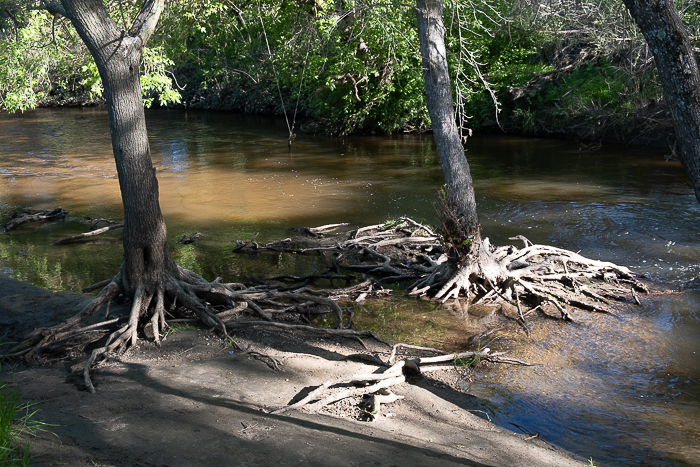
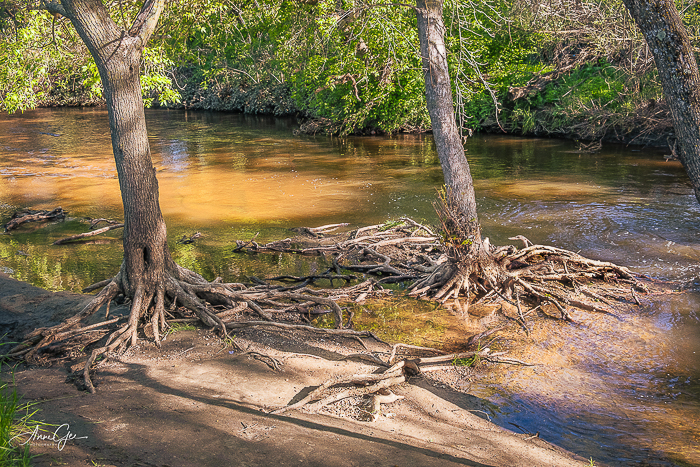
With that said, here’s my first image before and after. This was taken recently at Dry Creek in Roseville. The sun was bright and the trees provided shade, but not all the way. This resulted in roots that were bright and dark. The editing was done in Lightroom with the adjustment brush to burn in some of the roots. Then I toned down the shadows and brightened the image a bit. Then I intensified the color with the orange color slider. Original is on the left and Edited one is on the right.
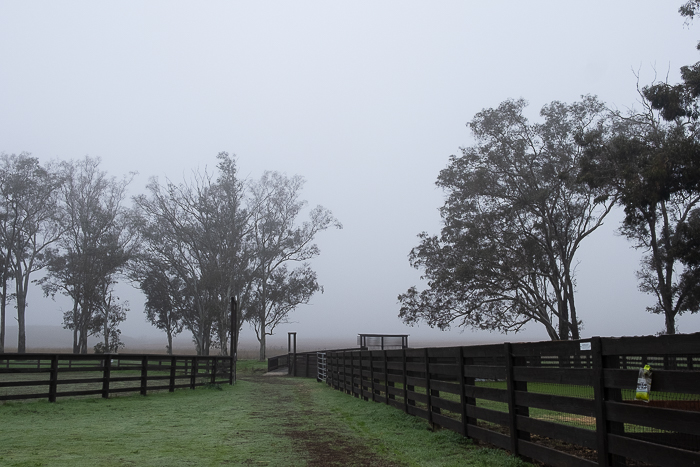
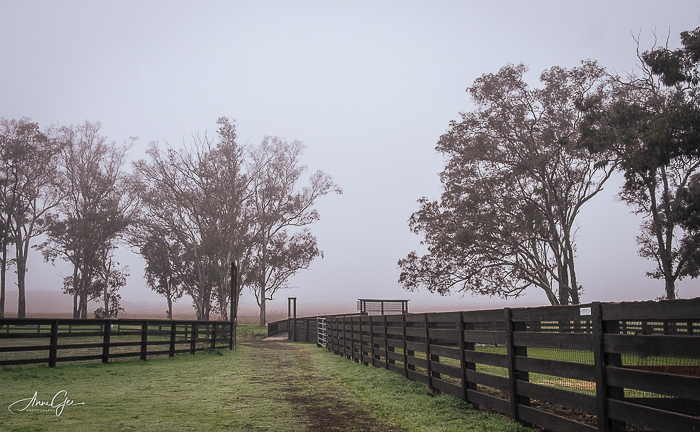
Next is Rush Ranch taken in January. It was a foggy day which didn’t bother me. I love the mood fog gives an image. But it can leave it dull. In this one, I brightened it with the tone curve, added more contrast, did a sky select and used the blue slider to accent the fog. In Photoshop, I removed the insect trap on the right. I use Photoshop when I want to remove something from a picture.
This flower was photographed last month at Jensen Botanical Garden. I cropped the photo to make the flower larger. I also lightened the background a bit and used the Lightroom sharpener for good measure.

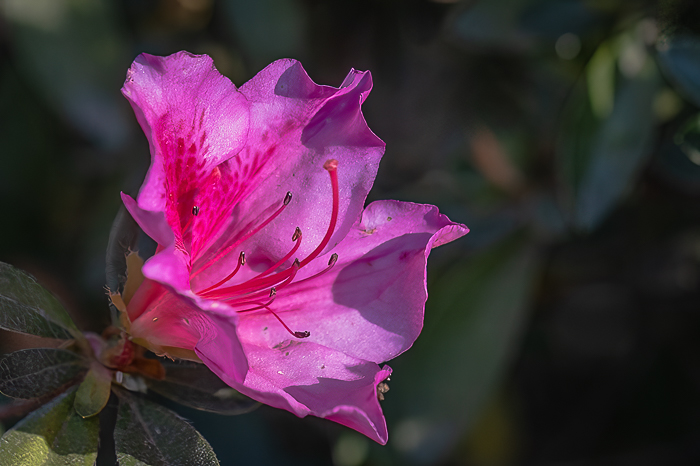
I believe composition is most important. Sometimes I photograph a tight composition and sometimes I give enough room for me to finish composing in editing. My first two examples were framed tight in the camera and this one wasn’t.
Thanks John for having us think about how we edit (or not), and how we can learn from how others edit. When you respond, please link to John’s original post and use the Lens-Artists tag. Last week we had fun with Sofia’s Water in Motion challenge. I enjoyed seeing all your various responses. Dawn is presenting next week’s challenge so look for her post.
Have a great week and take care!
 Slow Shutter Speed
Well done Anne! Loved the edited flower – you are such a master at flowers. Also loved the edits on your second image. Not sure on the opener though – I kind of liked the dark image – maybe something halfway between?? That’s the thing about photography and editing….beauty definitely in the eye of the beholder!
LikeLiked by 1 person
Thanks Tina! Yep, this thing that we do is totally subjective. Thanks again!
LikeLike
Right on, Anne! I love the brilliance and color you brought to the first two, and like Tina said, our are the master with flowers. I love the way it pops out of the screen.
LikeLiked by 1 person
Thanks Donna!
LikeLiked by 1 person
Anne, what a fantastic job you did in all of these images. The river image has so much more detail. You brought it to life. In the country scene, you were able to keep the beautiful mood we see in the original photo, and yet, you enhanced the image really well. Finally, the crop you applied in that flower photo was perfect. Like you, I sometimes take similar shots of the same image and leave some room around the subject to have room to work with in post-processing. Excellent choices and edits!
LikeLiked by 1 person
Thank you Egidio! I appreciate your comment.
LikeLiked by 1 person
You say you don’t edit much, and yet ‘I don’t edit that much and use Lightroom most of the time. I’ll go into NIK, Topaz and Photoshop for minor help’. I don’t even have any of those programmes. I actually like your unedited images as much as I do the edited ones. Perhaps because I’m not an editor!
LikeLiked by 1 person
Thanks Margaret! I’m happy you like my photos straight out of the camera.
LikeLiked by 1 person
🙂
LikeLiked by 1 person
These are beautiful edits, just enough to to enhance the images. Like you I use mainly lightroom, nearly all of the time. These so credit to your lovely photos.
LikeLiked by 1 person
Thanks Ritva. I love LR and need to learn how to use all of the new tools it has.
LikeLiked by 1 person
I find the masking tool very effective:-)
LikeLiked by 1 person
I like all of your edits, they all improve the original in my opinion 🙂 The only thing I’d do differently is perhaps keep a darker background around the flower to make it pop even more!
LikeLiked by 1 person
Thanks Sarah! Regarding the flower, thanks for your suggestion. I’m always open to critiques. I made the background lighter to show the flower’s environment and soften the image. But then, photography is subjective.
LikeLiked by 1 person
Gorgeous befores and stunning afters, Anne! I enjoy a bit of editing too and adding a bit of color, or warming up an image like you did with Dry creek makes it look like it should. We “see” warmth with our brains, but the lens doesn’t always. I found that to be true with my Antelope Canyon pictures. A smidge of warm color brings out the red in the canyon walls, and lets us all see what our own brains are seeing. LOL. Enjoy your week!
LikeLiked by 1 person
Thanks Terri! You said it so well.
LikeLiked by 1 person
I always find editing an interesting thing to discuss – not as bad as politics, thankfully – as everyone has an opinion. If I were a good photographer, that would be great to never edit a photo. A very good friend of mine always fought editing as he was a film photographer of long experience. He never got digital photography and he was a klutz on the computer, but when he did edit his digital photos his work was good – but he always complained about this and that! Me, I edit like crazy, from adding critters with PS AI to removing things and changing colors. Not quite graphic art, but as I prefer painting to photography, and have worked in the printing industry, editing a photo – analog or digital – is in the blood. Me, all for editing to get what I like to see or say.
And fun to see the before and after photos, too!
LikeLiked by 1 person
Thanks -N! This was a fun challenge. Today’s editing is too technical for me to learn at 80. As long as Lightroom gives me what I want, I’ll keep doing what I am. LR is not good at taking out stuff. That’s when I go over to Photoshop.
LikeLike
Great edits. I’ve never learned all those editing software packages, so this challenge was interesting to view what other photographers do and how much they edit. Sometimes cropping makes all the difference as you’ve shown in the flower image. I think I would have cropped that also as the foliage on the left-hand side detracted from the flower itself.
LikeLiked by 1 person
These are remarkable edit results, Anne! Love how you change the color for the first image. The flower photo is absolutely beautiful!
LikeLiked by 1 person
Thanks Amy! Just changing the color a bit can make the difference.
LikeLiked by 1 person
Wonderful Anne, I really like what you have done with that first one, took it from a cold sort of photo to something a lot warmer. I do really like the flower as well.
LikeLiked by 1 person
Thanks Leanne!
LikeLike
I like all three, especially how you brightened the fog, yet it’s still there!
LikeLiked by 1 person
Thank you Lindy!
LikeLike
Anne these are great before and after photos 😀
LikeLiked by 1 person
Thanks Cee. I appreciate your comment.
LikeLiked by 1 person
The warmer colors in your first picture made the interesting roots stand out more, Anne. Also liked your closer version of that lovely flower.
LikeLiked by 1 person
Thank you Siobhan!
LikeLike
Oh, I think my first comment didn’t go through! Here we go again… A wonderful set and beautiful images. I love your flower image. Your edits are terrific! I also love the misty morning image. As for your first river image, I actually prefer the first one. The shadows and shapes of the roots are really captivating. I enjoyed your description of the processes you used. Have a good week, too.
LikeLiked by 1 person
Thanks Patti! I appreciate your comments. I also thought the tree roots were something special. Take care.
LikeLiked by 1 person
In my photography, it’s the post processing that makes the image. Good examples of before and after!
LikeLiked by 1 person
Thanks Alessandra!
LikeLike
You might not do much but what you do is just right, Anne. You give your photos exactly what they need and they look so perfect because of that. I love all of them equally, this is a wonderful post!
LikeLiked by 1 person
Thanks Sofia! I appreciate your comment.
LikeLiked by 1 person
Nicely done Anne. Like you I don’t do that much editing apart of cropping and maybe making a bit darker.
LikeLiked by 1 person
Thanks Karina!
LikeLike