I just love to take my camera out for a walk. Editing is not something I truly enjoy. That doesn’t mean that I don’t edit. It just means that I’m not that good at it and rely on programs like Lightroom, Topaz, Color Efex and Silver Efex. Photoshop is too technical for me. So, Ritva’s challenge is truly a challenge for me!
Through the next three examples, I will try to explain how I use these editing programs. I’m sure I can use them more expertly; but this is my hobby, and I want to keep enjoying it!
Example 1 (original is on the left/edited is on the right) Fun at a neighborhood fair.
I like to stop by local fairs when I can catch them. It’s one of the few times I use my tripod because I like to catch the rides in slow motion. This picture of a ride that brings seated riders into the air as the chairs spin around.


First I changed it into black and white in Lightroom. Then I cropped it on the left and removed other rides on the right. I brought up the highlights and contrast to accent the twirling chairs. I wanted to draw attention to the blurred chairs and riders. Lightroom was the only program I used.
Next we were in a small town and I liked this tree that formed a tunnel over the sidewalk. I’m so glad that no one trimmed it!

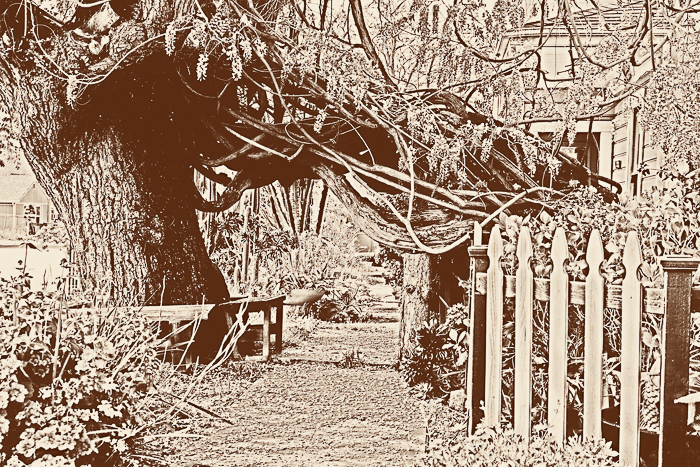
I took this photo into Silver Efex and chose one of their templates. I usually stop editing in Silver Efex at that point, sending it back into Lightroom. Once back in Lightroom, I worked on the highlights, darks and contrast. I like how it came out looking almost like a sketch.
On a visit to an Iris farm, we had so many beautiful flowers to photograph. I was in photo heaven!
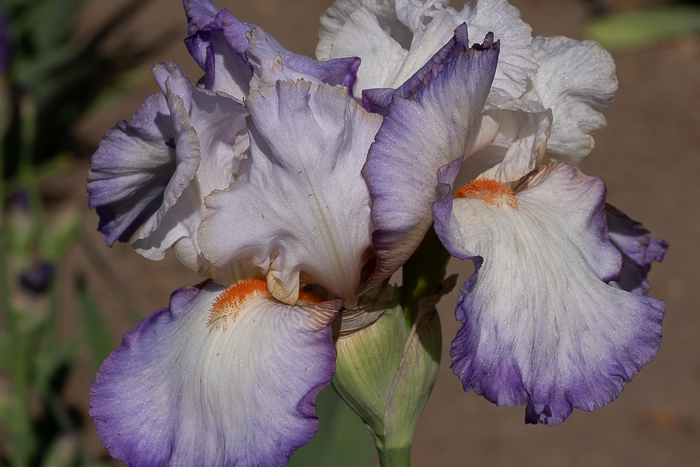
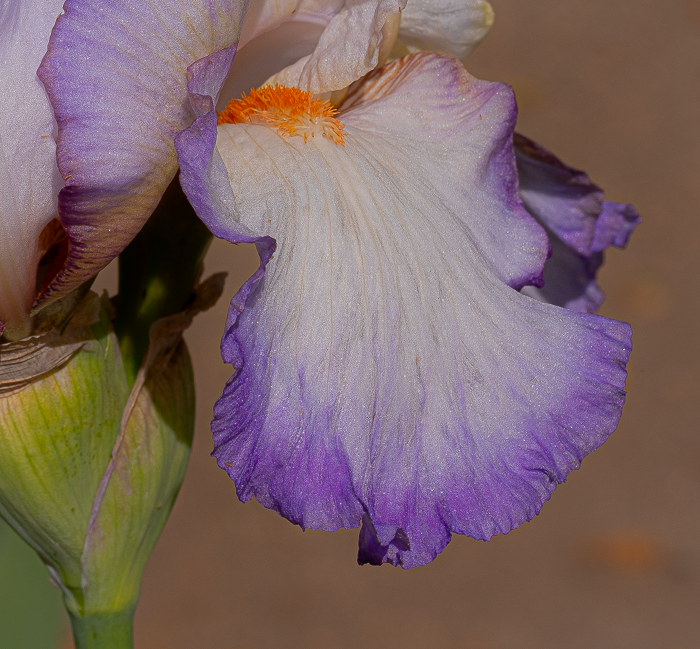
Because I wanted to accent just one petal, I cropped in closely. Now you can definitely see the interior and striations of each petal. I also softened the background. This was edited in Topaz Sharpener just to make sure the image was sharp when cropped. It was then brought back into Lightroom. I masked out the background to smooth it out. I’m so glad Lightroom now has a masking feature. I also saturated the colors a bit.
I doubt I will totally enjoy editing as much as I enjoy taking the picture. For me the goal is to get a good composition to begin with. Please link your challenge response to this post, and to Ritva who showed, through her artistic ability, how editing can enhance our pictures.
And thanks to Steve Hyde, Steve Hyde Photography Blog, for challenging us, last week, to choose our best images. Wow, that was tough and it was fun to see what you all chose. Next week, Sofia will be leading the challenge. Until then stay safe and be resilient.
 Slow Shutter Speed
Anne, what a great set you presented us! I loved the opener, especially because I don’t do night photography. Your color and monochrome are both wonderful. The sketch was another great choice. It’s like you sketched it yourself. Finally, the iris crop is so perfect. It brings out those details we seldom see. Wonderful set and edits!
LikeLiked by 2 people
Thanks Egidio! I do like night photography, but fairs are few and far between. The rest is the result of good editing programs. Knowing where to crop is my only talent! But fun is my goal!!
LikeLike
The first photo is other worldly, both in color as well as black and white… super trippy! I like the choices you made with editing, the different styles.
LikeLiked by 1 person
Thanks Arati! I’m glad there are great editing programs available.
LikeLiked by 1 person
Great to read your editing processes, Anne! Beautiful examples!
LikeLiked by 1 person
Thanks Terri! I think of them as my non-editing processes!!
LikeLiked by 1 person
Interesting to read of your editing process, especially since I don’t do much editing and only use the iMac in-house Photo software.
Ditto to Egidio’s comment. He said it all.
I love seeing before and after photos that other photographers make.
LikeLiked by 1 person
Thanks Vicki! I’m a PC user, but I bet your iMac software is powerful.
LikeLike
The Photo software (or app.) in any Mac is basic, but solves about 97% of my basic editing needs. My only complaint is that the latest software update for the Mac has a much poorer erasure (or rubbing out) button than the previous software update (IMO). Or maybe I just need more practice using it. LOL
LikeLiked by 1 person
Great photos – love the fair ones!
LikeLiked by 1 person
Thanks Nora!
LikeLiked by 1 person
For an editing-refuser, you’ve done a great job. I too am no editor. Correct the horizon, crop a bit maybe, job done. If the photo requires more, I junk it. You demonstrate however that it can be worth going a bit further.
LikeLiked by 1 person
Thanks Margaret! I can go just a bit further, beyond that, I get into trouble.
LikeLiked by 1 person
🤣
LikeLiked by 1 person
Dear Anne
We think your pictures are well edited. We prefer the edited pictures to the originals.
The Fab Four of Cley
🙂 🙂 🙂 🙂
LikeLiked by 1 person
Thanks! It’s good to know that my edits are worth the effort.
LikeLiked by 1 person
Beautiful examples Anne, I really like the ride at the fair! Great conversion! The iris flower crop is also a great composition as well!
LikeLiked by 1 person
Thanks Pamela!
LikeLike
Anne, You are editing the way it is the most essential – to showcase what you want us to see. I think the black and white is great. Just the basics and the that is the result. And You did great work on the sketch, I should also try that.
LikeLiked by 1 person
Thanks Ritva! Regarding the sketch, I didn’t do anything but choose the template and try to increase the contrast. However, I do like the template and may try it on other images.
LikeLiked by 1 person
Best-ever line in a blog post: but this is my hobby, and I want to keep enjoying it! So often technical details can mar the pleasure in an art, a craft or a hobby. Love, this sentence!
You chose three amazing photographs. Your edits are all great. My absolute favourite (by a country mile) is the garden gate edit. It now looks so romantic, as if it came from a book of faerie tales or a book of old poems. It’s truly lovely!
I’m not adept at editing, indeed I have none of the software/apps you described. Like you, though, it’s definitely not my favourite “chore”.
Lovely post and thank you for sharing your thoughts. pp
LikeLiked by 1 person
Thanks! It’s important to enjoy what you do and not get caught up in technical stuff–unless you enjoy doing technical.
LikeLiked by 1 person
You say you’re not good at editing but these examples prove you wrong! All are improved by the work you’ve put into them 🙂 I especially love the way you cropped the iris to a single petal!
LikeLiked by 1 person
Thanks Sarah!
LikeLiked by 1 person
Well done Anne! I know what you mean about shooting vs editing but clearly you understand editing very well! The goal is to have a wonderful image to start and then to create what you’d like to focus on in your mind’s eye. In all cases you’ve created something different and both your originals and your edited versions are terrific. My favorite the week is your fair image.
LikeLiked by 2 people
Thanks Tina!
LikeLike
Love the way you talk us through the various processes.
LikeLiked by 1 person
Thanks Tish!
LikeLike
All of your techniques work well, Anne. I love that fairground ride edit and the iris petal deserves to be shown in all its beauty xx
LikeLiked by 2 people
Thanks Jo!
LikeLike
Skilfully done, Anne! I love the fairground shot but I and really taken by the editing on your second one, it is fantastic.
LikeLiked by 2 people
Thanks Sofia!
LikeLiked by 1 person
Anne, for someone who doesn’t really enjoy editing you did a fantastic job with these! I love the final edit of the tree.
LikeLiked by 2 people
Thanks Beth!
LikeLiked by 1 person
I downloaded Gimp but it’s way too complicated for me. Even with YouTube tutorials, I couldn’t figure it out. For years, I’ve used Photoscape, a free program that is very user friendly and intuitive.
Recently, I’ve gotten into trouble because I started using AI software to edit my photos. With a simple word prompt, it can perform the complicated edits that I couldn’t figure out on Gimp.
Here’s the problem — when the images are scanned by AI detectors, they register as fake. That’s because AI edits leave behind an AI signature that is then detected by AI scanners.
I learned that AI scanners generate a lot of false positives, and that I should just ignore the results. Ethically, the general consensus among photographers is that it’s okay to use AI editing in the same way that you use Photoshop, but even a simple task like cropping would leave an AI signature. (By the way, I love the flower crop.)
The workaround, I was told, is to take a screenshot of the edited image and post that on your blog or social media. Nope, that didn’t work. The images still scan as fake and read as a screenshot when opened in a different window.
Yesterday, I finally found a solution. In Photoscape, I simply added a bit of noise to the images and they scanned as 97% real.
I hope this information is useful to people who perform both simple and complex edits on their images.
LikeLiked by 1 person
I’m glad you found a “work around” when editing. I don’t want to work that hard! If a picture is too hard to edit, it gets deleted. I have a friend who is really into editing. He will spend hours and find new editing programs to bring a photo to his original visual concept. And, he enjoys it!
LikeLiked by 1 person